Iteration trees#
Iteration trees are used by Phileas to represent complex iterables over data trees in a functional manner. In short, they are a way to represent and work with iteration as data.
Data trees#
DataTree are the simplest trees that
Phileas works with. They represent what a simple JSON or YAML file is parsed
to. They are defined as nested Python dict and list objects.
Eventually, they contain bool, str, int, float or None
leaves, which are referred to as DataLiteral.
Actually, DataLiteral can also be of type
_NoDefault, which is a special sentinel value used to represent the default
value of IterationTree which do not have one.
See also
For more information on default values, see Default value.
Non-None data literals are used as keys of mapped containers, and are
referred to as Key.
Iteration trees: collections of data trees#
IterationTree are iterables
over DataTree objects, that can be composed in
order to iterate over complex spaces in a diverse manner.
Iteration#
Iteration trees are meant to store collections of data trees and make them easily accessible. They allow, for example, these statements:
 1iteration_tree = CartesianProduct({
 2    "parameter1": Sequence([1, 2, 3]),
 3    "parameter2": Sequence(["a", "b", "c"]),
 4})
 5
 6for data_tree in iteration_tree:
 7    print(data_tree)
 8
 9print(list(iteration_tree))
10
11iterator = iter(iteration_tree)
12print(f"The third value is {iterator[3]}")
{'parameter1': 1, 'parameter2': 'a'}
{'parameter1': 1, 'parameter2': 'b'}
{'parameter1': 1, 'parameter2': 'c'}
{'parameter1': 2, 'parameter2': 'a'}
{'parameter1': 2, 'parameter2': 'b'}
{'parameter1': 2, 'parameter2': 'c'}
{'parameter1': 3, 'parameter2': 'a'}
{'parameter1': 3, 'parameter2': 'b'}
{'parameter1': 3, 'parameter2': 'c'}
[{'parameter1': 1, 'parameter2': 'a'}, {'parameter1': 1, 'parameter2': 'b'}, {'parameter1': 1, 'parameter2': 'c'}, {'parameter1': 2, 'parameter2': 'a'}, {'parameter1': 2, 'parameter2': 'b'}, {'parameter1': 2, 'parameter2': 'c'}, {'parameter1': 3, 'parameter2': 'a'}, {'parameter1': 3, 'parameter2': 'b'}, {'parameter1': 3, 'parameter2': 'c'}]
The third value is {'parameter1': 2, 'parameter2': 'a'}
Under the hood, iteration trees are Python iterables, and iteration is managed
by TreeIterator. They are usual Python one-way
iterators, with two additional features:
two-way iteration:
reverse()changes the iteration direction of an iterator. This allows to go back in iteration time, for example to replay experiment iterations found to be invalid. The iteration direction is obtained byis_forward().random access: The iteration position can be modified to any supported index by
update(). Alternatively, you can use the[]operator. Additionally, the iteration position can bereset()to its starting value. Be careful, the starting value depends on the iteration direction: resetting a forward iterator brings it back to position 0; resetting a backward iterator brings it to the last supported position. Random access allows to replay any iteration without the expensive cost of iterating over all its preceding indices.
Note
Developers can useOneWayTreeIterator to implement
a two-way iterator from a one-way implementation. This is useful in situations where true random access is hard to design.
A recursive tree structure#
Iteration trees have a recursive structure, where the different nodes correspond to different Python classes.
Iteration leaves#
The leaves of iteration trees represent simple collections, and are stored in
IterationLeaf objects.
You can store Python lists in Sequence, and
simple fixed values are represented by
IterationLiteral. Other iteration leaves,
including numeric ranges and randomly generated sequences, are available in
modulephileas.iteration.leaf.
Here are some iteration leaves examples:
1literal = IterationLiteral([1, 2, 3])
2num_range = LinearRange(start=1, end=2, steps=12)
3integer_range = IntegerRange(start=0, end=math.inf)
4uniform = NumpyRNG()
5bigint_uniform = UniformBigIntegerRng(low=0, high=1 << 32)
6prime_number = PrimeRng(low=200, high=300)
N-ary nodes: iteration methods#
Iteration leaves can then be composed in order to obtain complex iteration
behaviors, using iteration methods.
IterationMethod is the class of n-ary iteration
tree nodes: it has multiple children, and represents how to iterate over all
of them at the same time. These children are supplied either as a list, or as
a dictionary with Key keys.
See also
Iteration methods are implemented in the
phileas.iteration.node module.
Cartesian product#
The simplest iteration method is
CartesianProduct, which is roughly equivalent to
nested for loops.
 1tree1 = Sequence(["1.1", "1.2"])
 2tree2 = Sequence(["2.1", "2.2"])
 3tree3 = Sequence(["3.1", "3.2"])
 4
 5print("This is equivalent...")
 6for value1 in tree1:
 7    for value2 in tree2:
 8        for value3 in tree3:
 9            print(f"{value1=}, {value2=}, {value3=}")
10
11print("...to that")
12for value in CartesianProduct(dict(value1=tree1, value2=tree2, value3=tree3)):
13    print(value)
This is equivalent...
value1='1.1', value2='2.1', value3='3.1'
value1='1.1', value2='2.1', value3='3.2'
value1='1.1', value2='2.2', value3='3.1'
value1='1.1', value2='2.2', value3='3.2'
value1='1.2', value2='2.1', value3='3.1'
value1='1.2', value2='2.1', value3='3.2'
value1='1.2', value2='2.2', value3='3.1'
value1='1.2', value2='2.2', value3='3.2'
...to that
{'value1': '1.1', 'value2': '2.1', 'value3': '3.1'}
{'value1': '1.1', 'value2': '2.1', 'value3': '3.2'}
{'value1': '1.1', 'value2': '2.2', 'value3': '3.1'}
{'value1': '1.1', 'value2': '2.2', 'value3': '3.2'}
{'value1': '1.2', 'value2': '2.1', 'value3': '3.1'}
{'value1': '1.2', 'value2': '2.1', 'value3': '3.2'}
{'value1': '1.2', 'value2': '2.2', 'value3': '3.1'}
{'value1': '1.2', 'value2': '2.2', 'value3': '3.2'}
With the snake argument, you can enforce that, from an iteration to the other,
the value of only one children changes.
1tree1 = Sequence([1, 2, 3])
2tree2 = Sequence(["a", "b", "c"])
3for value in CartesianProduct(dict(tree1=tree1, tree2=tree2), snake=True):
4    print(value)
{'tree1': 1, 'tree2': 'a'}
{'tree1': 1, 'tree2': 'b'}
{'tree1': 1, 'tree2': 'c'}
{'tree1': 2, 'tree2': 'c'}
{'tree1': 2, 'tree2': 'b'}
{'tree1': 2, 'tree2': 'a'}
{'tree1': 3, 'tree2': 'a'}
{'tree1': 3, 'tree2': 'b'}
{'tree1': 3, 'tree2': 'c'}
Note
Notice how only the iteration order is affected, and not the set of iterated values. Generally speaking, iteration methods always represent the same set of values.
Since only one children value changes at each iteration, it is oftentimes not
necessary to return all the other fixed values. Iteration methods have a lazy
boolean parameter, which addresses this situation. When it is set, only the
children values that have changed since the last iteration are returned.
1tree1 = Sequence([1, 2, 3])
2tree2 = Sequence(["a", "b", "c"])
3for value in CartesianProduct(dict(tree1=tree1, tree2=tree2), snake=True, lazy=True):
4    print(value)
{'tree1': 1, 'tree2': 'a'}
{'tree2': 'b'}
{'tree2': 'c'}
{'tree1': 2}
{'tree2': 'b'}
{'tree2': 'a'}
{'tree1': 3}
{'tree2': 'b'}
{'tree2': 'c'}
The lazy argument is effective only with dict children.
Note
For now, iteration methods are not required to implement support for lazy.
Union#
While the cartesian product iteration method is equivalent to nested for
loops, Union behaves like for loops in series.
It guarantees that the values of each of its children are generated at least
once, but does so with the minimum number of generated elements.
1tree1 = Sequence(["1.1", "1.2", "1.3"])
2tree2 = Sequence(["2.1", "2.2", "2.3"])
3tree3 = Sequence(["3.1", "3.2", "3.3"])
4
5for value in Union(dict(value1=tree1, value2=tree2, value3=tree3)):
6    print(value)
{'value1': '1.1', 'value2': '2.1', 'value3': '3.1'}
{'value1': '1.2', 'value2': '2.1', 'value3': '3.1'}
{'value1': '1.3', 'value2': '2.1', 'value3': '3.1'}
{'value1': '1.1', 'value2': '2.1', 'value3': '3.1'}
{'value1': '1.1', 'value2': '2.2', 'value3': '3.1'}
{'value1': '1.1', 'value2': '2.3', 'value3': '3.1'}
{'value1': '1.1', 'value2': '2.1', 'value3': '3.1'}
{'value1': '1.1', 'value2': '2.1', 'value3': '3.2'}
{'value1': '1.1', 'value2': '2.1', 'value3': '3.3'}
Notice how, after iteration over a children is done, it is reset to its initial
value. This is controlled by the reset parameter, which can have four
different values:
"first"(default) sets it to its first value, and “last” to its last value;"default"sets it to its default value;None, which is only valid withdictchildren, does not set the children value after iteration.
Similarly, the preset parameter controls the value of children whose iteration
has not started yet. It can have values "first" (default), "default" and
None, which have the same meaning as with reset.
To keep the children at their last value, and not presetting them, you can use:
1tree1 = Sequence(["1.1", "1.2", "1.3"])
2tree2 = Sequence(["2.1", "2.2", "2.3"])
3tree3 = Sequence(["3.1", "3.2", "3.3"])
4
5for value in Union(dict(value1=tree1, value2=tree2, value3=tree3), preset=None, reset="last"):
6    print(value)
{'value1': '1.1'}
{'value1': '1.2'}
{'value1': '1.3'}
{'value1': '1.3', 'value2': '2.1'}
{'value1': '1.3', 'value2': '2.2'}
{'value1': '1.3', 'value2': '2.3'}
{'value1': '1.3', 'value2': '2.3', 'value3': '3.1'}
{'value1': '1.3', 'value2': '2.3', 'value3': '3.2'}
{'value1': '1.3', 'value2': '2.3', 'value3': '3.3'}
Finally, when preset = "first", the first iteration of each children
(except for the first) might be redundant, since the first global iteration
already sets the values correctly. Parameter common_preset allows to get rid
of it:
1tree1 = Sequence(["1.1", "1.2", "1.3"])
2tree2 = Sequence(["2.1", "2.2", "2.3"])
3tree3 = Sequence(["3.1", "3.2", "3.3"])
4
5for value in Union(dict(value1=tree1, value2=tree2, value3=tree3), common_preset=True):
6    print(value)
{'value1': '1.1', 'value2': '2.1', 'value3': '3.1'}
{'value1': '1.2', 'value2': '2.1', 'value3': '3.1'}
{'value1': '1.3', 'value2': '2.1', 'value3': '3.1'}
{'value1': '1.1', 'value2': '2.2', 'value3': '3.1'}
{'value1': '1.1', 'value2': '2.3', 'value3': '3.1'}
{'value1': '1.1', 'value2': '2.1', 'value3': '3.2'}
{'value1': '1.1', 'value2': '2.1', 'value3': '3.3'}
Zip#
The Zip node behaves similarly as the built-in
zip function: it iterates over all of its children at the same time.
1tree1 = Sequence(["1.1", "1.2", "1.3"])
2tree2 = Sequence(["2.1", "2.2"])
3
4for value in Zip([tree1, tree2]):
5    print(value)
['1.1', '2.1']
['1.2', '2.2']
Here, iteration over tree1 stops before its end is reached. If you want to
reach the end of all the children, you can specify the argument
stops_at="longest":
1tree1 = Sequence(["1.1", "1.2", "1.3"])
2tree2 = Sequence(["2.1", "2.2"])
3
4for value in Zip(dict(value1=tree1, value2=tree2), stops_at="longest"):
5    print(value)
{'value1': '1.1', 'value2': '2.1'}
{'value1': '1.2', 'value2': '2.2'}
{'value1': '1.3'}
Note that we switched the type of the children to dict. It is required when
stops_at = "longest", as some children elements might go missing.
1tree1 = Sequence(["1.1", "1.2", "1.3"])
2tree2 = Sequence(["2.1", "2.2"])
3
4for value in Zip([tree1, tree2], stops_at="longest"):
5    print(value)
---------------------------------------------------------------------------
ValueError                                Traceback (most recent call last)
Cell In[12], line 4
      1 tree1 = Sequence(["1.1", "1.2", "1.3"])
      2 tree2 = Sequence(["2.1", "2.2"])
----> 4 for value in Zip([tree1, tree2], stops_at="longest"):
      5     print(value)

File <string>:9, in __init__(self, children, order, lazy, stops_at, ignore_fixed)

File ~/checkouts/readthedocs.org/user_builds/phileas/checkouts/latest/phileas/iteration/node.py:709, in Zip.__post_init__(self)
    706     raise ValueError("Zip only supports longest and shortest stops_at.")
    708 if self.stops_at == "longest" and isinstance(self.children, list):
--> 709     raise ValueError("Zip with stops_at = longest requires dict children.")

ValueError: Zip with stops_at = longest requires dict children.
Iteration trees often contain literal leaves, which represent a single value.
They are typically used when configuring an instrument with a fixed value.
Putting them inside a zip node with stops_at = "shortest" would thus create a
node with length 1. Most of the time, this is not expected, which is why the
attribute ignore_fixed is added. By default, it is set. In this case, fixed
values are ignored during iteration:
1tree1 = Sequence(["1.1", "1.2", "1.3"])
2tree2 = Sequence(["2.1"])
3
4for value in Zip(dict(value1=tree1, value2=tree2)):
5    print(value)
{'value1': '1.1', 'value2': '2.1'}
{'value1': '1.2', 'value2': '2.1'}
{'value1': '1.3', 'value2': '2.1'}
Otherwise, iteration is restricted to the first children values:
1tree1 = Sequence(["1.1", "1.2", "1.3"])
2tree2 = Sequence(["2.1"])
3
4for value in Zip(dict(value1=tree1, value2=tree2), ignore_fixed=False):
5    print(value)
{'value1': '1.1', 'value2': '2.1'}
Pick#
Pick behaves similarly as union iteration,
however it randomly picks the children which is being iterated over. You can
think of it as a randomized lazy union, with the notable exception that it can
accept infinite children.
1tree1 = IntegerRange(start=1, end=math.inf)
2tree2 = IntegerRange(start=1, end=math.inf)
3tree3 = IntegerRange(start=1, end=math.inf)
4pick = generate_seeds(Pick(dict(value1=tree1, value2=tree2, value3=tree3)))
5
6for value in itertools.islice(pick, 10):
7    print(value)
{'value3': 1}
{'value2': 1}
{'value2': 2}
{'value1': 1}
{'value1': 2}
{'value1': 3}
{'value1': 4}
{'value1': 5}
{'value1': 6}
{'value3': 2}
Note
This is an example of a random iteration tree. They require to be seeded, which
is done here by generate_seeds().
This section covers random iteration trees.
Unary nodes#
Unary nodes only have a single child, and can do two things with it:
either they change its iteration order, or
they change the values it generates, in which case they are called transform nodes.
Shuffle#
The Shuffle node applies a random permutation to
its child, which must have a finite length. It is another example of a
random tree.
1shuffle = generate_seeds(Shuffle(Sequence([1, 2, 3, 4, 5])))
2print(list(shuffle))
[4, 3, 2, 5, 1]
First#
The First node only returns the first elements of
its child.
1first = First(IntegerRange(0, math.inf, 1), 10)
2print(list(first))
[0, 1, 2, 3, 4, 5, 6, 7, 8, 9]
Transform nodes#
Transform nodes are used to apply functions that
modify the value of a tree during iteration, leaving its iteration order
unmodified.
Let us consider the an iteration tree which specifies a set of positions
expressed in radial coordinates. The radius rho_m is in meters, and the
angle theta_deg in degrees. However, we want to use cartesian coordinates,
for, let’s say, configuring independent linear motors. The first solution is to
directly perform the coordinate transformation after iteration:
 1tree_radial = CartesianProduct({
 2    "rho_m": LinearRange(1, 2, steps=3),
 3    "theta_deg": LinearRange(0, 45, steps=3)
 4})
 5
 6for position_radial in tree_radial:
 7    theta_rad = position_radial["theta_deg"] * math.pi / 180
 8    position_cartesian = {
 9        "x": position_radial["rho_m"] * math.cos(theta_rad),
10        "y": position_radial["rho_m"] * math.sin(theta_rad),
11    }
12    print(position_cartesian)
This solution can easily become unmaintainable, as parameters generation is
split between the iteration tree definition and its iteration logic.
Transform are meant to solve this issue, by
incorporating data tree modifications directly in the iteration tree.
We could refactor the former example by using the
FunctionalTransform node, which simply wraps a
Python function:
 1tree_radial = CartesianProduct({
 2    "rho_m": LinearRange(1, 2, steps=3),
 3    "theta_deg": LinearRange(0, 45, steps=3)
 4})
 5
 6def radial_to_cartesian(t: DataTree) -> DataTree:
 7    theta_rad = t["theta_deg"] * math.pi / 180
 8    return {
 9        "x": t["rho_m"] * math.cos(theta_rad),
10        "y": t["rho_m"] * math.sin(theta_rad),
11    }
12
13tree_cartesian = FunctionalTranform(tree_radial, radial_to_cartesian)
14
15for position_cartesian in tree_cartesian:
16    print(position_cartesian)
Other transform nodes are available in the phileas.iteration.node
module. They include Lazify which behaves
similarly as the lazy argument of iteration methods, only keeping changed
key of dict children, and its converse
node Accumulator.
Random trees#
RandomTree provides an interface for iteration
trees which have random behavior. As iteration trees are designed to be
deterministic, those trees are not actually random. Instead, they provide
deterministic pseudo-random behavior depending only on their
seed attribute. You can set it
manually, yet it is not advised. Instead, it is more convenient to use the
generate_seeds() utility function, which
generates all the seeds of a tree, guaranteeing that they will be different.
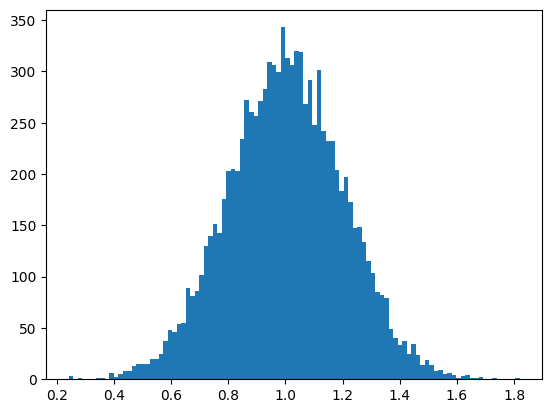
Iteration on various distributions is provided by
NumpyRNG, which uses a random number generator
provided by numpy.
1rng = generate_seeds(NumpyRNG(distribution=np.random.Generator.normal, kwargs=dict(loc=1, scale=0.2)))
2
3ax = plt.subplot()
4_ = ax.hist(list(itertools.islice(rng, 10000)), bins=100)
Breaking the recursive tree structure with configurations#
Iteration trees are recursive and local by nature: iterations over siblings of a node are independent. However, sometimes, global iteration tree behavior are required. Some can be obtained using transform nodes, yet this is usually hacky and cost expensive. Using configurations, on the other end, is a built-in feature of iteration tree which is efficient and permits global behavior.
Let us study a simple example. We want to generate data for an instrument in two phases:
in phase 1, its parameter varies;
during the multiple iterations of phase 2, its parameter is fixed.
This could be done with two iteration trees. However, this would not be compatible with a single experiment configuration file. Alternatively, a transform node could be used, to pick between two entries, but this would be hard to modify and understand.
Configurations can solve this the following way:
 1tree = CartesianProduct({"instrument": Configurations({
 2    "1": CartesianProduct({
 3        "parameter": Sequence([10, 20, 30])
 4    }),
 5    "2": CartesianProduct({
 6        "parameter": IterationLiteral(0),
 7        "iteration": IntegerRange(1, 3)
 8    }),
 9})})
10
11for data_tree in tree:
12    print(data_tree)
{'instrument': {'parameter': 10}}
{'instrument': {'parameter': 20}}
{'instrument': {'parameter': 30}}
{'instrument': {'iteration': 1, 'parameter': 0}}
{'instrument': {'iteration': 2, 'parameter': 0}}
{'instrument': {'iteration': 3, 'parameter': 0}}
Iterating through a configurable tree. It is automatically unrolled, but it is advised to explicitly call IterationTree.unroll_configurations before iteration.
Notice the log, which reminds us that the tree is configurable. Under the hood,
unroll_configurations() is used to
convert a configurable tree to a simple tree without any configuration. This is
done by transforming the tree to a simple union of its configurations
[1].
Note
This shows that configurations are not strictly required. However, their use is convenient, and prevents some common mistakes.
Configurations() node can be configured with two
parameters:
insert_namekeeps the name of the selected configuration, alongside the actual configuration value;move_upinsert the configuration value one level up.
With insert_name...
{'instrument': {'_configuration': '1', 'parameter': 10}}
{'instrument': {'_configuration': '1', 'parameter': 20}}
{'instrument': {'_configuration': '1', 'parameter': 30}}
{'instrument': {'_configuration': '2', 'iteration': 1, 'parameter': 0}}
{'instrument': {'_configuration': '2', 'iteration': 2, 'parameter': 0}}
{'instrument': {'_configuration': '2', 'iteration': 3, 'parameter': 0}}

With move_up...
{'parameter': 10}
{'parameter': 20}
{'parameter': 30}
{'iteration': 1, 'parameter': 0}
{'iteration': 2, 'parameter': 0}
{'iteration': 3, 'parameter': 0}
Iterating through a configurable tree. It is automatically unrolled, but it is advised to explicitly call IterationTree.unroll_configurations before iteration.
Iterating through a configurable tree. It is automatically unrolled, but it is advised to explicitly call IterationTree.unroll_configurations before iteration.
With insert_name, the actual configuration is inserted in the _configuration
key. If it is combined with move_up, it is inserted where the configuration
used to be, here in "instrument":
With move_up and insert_name...
{'instrument': '1', 'parameter': 10}
{'instrument': '1', 'parameter': 20}
{'instrument': '1', 'parameter': 30}
{'instrument': '2', 'iteration': 1, 'parameter': 0}
{'instrument': '2', 'iteration': 2, 'parameter': 0}
{'instrument': '2', 'iteration': 3, 'parameter': 0}
Iterating through a configurable tree. It is automatically unrolled, but it is advised to explicitly call IterationTree.unroll_configurations before iteration.
Individual configurations can also be obtained directly, without resorting to
iteration. Each iteration tree has a
configurations attribute which
contains the set of its configuration names.
get_configuration() can be used to
query them individually.
Access and modifications#
Access with the [] operator#
Internal nodes of iteration trees can be accessed as if they where nested dict
or list objects, using the [] operator. This is useful, especially for
shallow trees, as in the following example:
1tree = CartesianProduct([Sequence([1, 2, 3]), Sequence(["a", "b", "c"])])
2print(f"The first element of the second child is {tree[1][0]!r}.")
The first element of the second child is 'a'.
Access and modifications with the path API#
However, as iteration trees becomes deeper, accessing internal nodes becomes
cumbersome. Indeed, [index1]...[indexN] chains are often poorly readable.
Furthermore, they don’t allow tree modifications.
The so-called path API solves these issues. A node that would be accessed
through the indexing chain [index1]...[indexN] is said to be located at the
ChildPath [index1, ..., indexN]. Then,
different methods can be used to get and modify the structure of the tree,
using path arguments.
The different available methods are:
get()which returns the node at a given path;with_params()which changes some parameters of a node;replace_node()which replaces the type of node;insert_child()which adds or removes a node;remove_child()which removes a node;insert_unary()which inserts a unary node as a parent of another node.
Note that a purely functional style is used: an iteration tree object is a
frozen dataclass instance, and its attributes must not
be modified. However, a new, modified, iteration tree can be derived from it.
This prevents side-effects bugs, and allows to chain tree modifications as in
the following example.
1tree = CartesianProduct([Sequence([1, 2, 3]), Sequence(["a", "b", "c"])])
2new_tree = (
3    tree.insert_unary([0], Shuffle)               # Shuffle the first child
4    .with_params([], snake=True)                  # Enable snake for the root
5    .insert_child([1], Sequence([True, False]))   # Replace the second child
6)
7pprint(new_tree)
CartesianProduct(children=[Shuffle(child=Sequence(elements=[1, 2, 3],
                                                  default_value=_NoDefault()),
                                   seed=None),
                           Sequence(elements=[True, False],
                                    default_value=_NoDefault())],
                 order=None,
                 lazy=False,
                 snake=True)
Attention
Iteration trees must be considered as immutable objects. However, effectively, there are ways to modify their state. They should not be used, unless for a really good reason. In this case, side-effects might occur, unexpectedly violating assumptions and probably breaking your code. Be cautious !
Default value#
Each iteration tree has a default value, which is accessed with the
default() method. Some iteration
methods use it for iteration (in particular,
Union). It is also useful to represent a safe
state of an experiment, where it can get back in case of an unexpected event,
or after measurements are done. In this sense, it is another way of breaking
the local nature of iteration trees, beside configurations.
Pseudo data trees#
Iteration trees represent complex collections alongside the way to iterate over
them. Yet, it can sometimes be inconvenient to use them when only iteration
leaves are of interest. On the other hand, data trees are simple Python objects
that are easy to work with, but they miss the information stored in iteration
nodes and in most iteration leaves.
PseudoDataTree are an intermediate type that is
useful in these cases.
Similarly to data trees, they consist of nested dict and list, so they don’t
convey any information about how to combine nodes. However, their leaves are
either data literals - None, bool, str, int or float - or actual
iteration leaves. You can obtain them
using to_pseudo_data_tree().