Example: side-channel analysis#
This example illustrates how to use Phileas to take measurements for a typical side-channel analysis experiment.
Experimental setup#
A simple current side-channel dataset is acquired, which requires the following experimental setup:
the device under test consists of an electronic component with an embedded implementation of the PRESENT cypher.
A control computer can communicate with the tested device through a serial link. To establish the connection, it requires a baudrate and a peripheral path.
Its current consumption is monitored by plugging a current probe to its power supply.
The probe output is sampled by an oscilloscope, which is synchronized with the target algorithm using an external trigger.
Bench description#
The first step to prepare the data acquisition is to describe the instruments available on the bench, and how to establish a connection with them. This is done by the bench configuration file:
 1bench = """
 2simulated_present_dut:
 3  loader: phileas-mock_present-phileas
 4  device: /dev/ttyUSB1
 5  baudrate: 115200
 6  probe: simulated_current_probe
 7
 8simulated_current_probe:
 9  loader: phileas-current_probe-phileas
10
11simulated_oscilloscope:
12  loader: phileas-mock_oscilloscope-phileas
13  probe: generic
14  probe-name: simulated_current_probe
15  width: 32
16"""
Here, we declare that our bench is composed of three bench instruments: the
embedded PRESENT implementation simulated_present_dut is connected to a
current probe simulated_current_probe. An oscilloscope
simulated_oscilloscope records the output of the probe.
Attention
Here, we store the content of the bench configuration file in the bench
variable, as it is easier to work with it from a notebook. However, you should
usually store this in a YAML file, say bench.yaml. Indeed, it is then easier
to share, maintain and modify, and this way it does not pollute the acquisition
script.
Experiment description#
We can then describe what instruments are required and how to configure them, which is done by the experiment configuration file. If we want to perform a single encryption, with a unique key and plaintext, we could do it with:
 1experiment = """
 2dut:
 3  interface: present-encryption
 4  key: 12
 5  plaintext: 1
 6
 7oscilloscope:
 8  interface: oscilloscope
 9  amplitude: 10
10"""
This configuration requires two experiment instruments. dut must be a device
which supports the present-encryption interface. Its configuration consists
of the specified key and plaintext. Similarly, oscilloscope must be an
oscilloscope device.
Attention
Here, we store the content of the experiment configuration file in the
experiment variable, as it is easier to work with it from a notebook.
However, you should usually store this in a YAML file, say experiment.yaml.
Indeed, it is then easier to share, maintain and modify, and this way it does
not pollute the acquisition script.
Instruments instantiation#
We can finally let Phileas handle the instantiation of the instruments, which is
done by ExperimentFactory:
1factory = ExperimentFactory(bench, experiment)
2factory.initiate_connections()
3print("Here are the experiment instruments:")
4pprint(factory.experiment_instruments)
5
6oscilloscope = factory.experiment_instruments["oscilloscope"]
7dut = factory.experiment_instruments["dut"]
INFO:phileas:Bench configuration supplied as a data tree.
INFO:phileas:Bench instrument simulated_present_dut assigned to loader <class 'phileas.mock_instruments.SimulatedPRESENTImplementationLoader'>.
INFO:phileas:Bench instrument simulated_current_probe assigned to loader <class 'phileas.mock_instruments.CurrentProbeLoader'>.
INFO:phileas:Bench instrument simulated_oscilloscope assigned to loader <class 'phileas.mock_instruments.OscilloscopeLoader'>.
INFO:phileas:Experiment configuration supplied as an iteration tree.
INFO:phileas:Matching experiment instrument dut with bench instrument simulated_present_dut.
INFO:phileas:Matching experiment instrument oscilloscope with bench instrument simulated_oscilloscope.
INFO:phileas:Initiating connections to the used instruments.
INFO:phileas.simulated_present_dut:Initiating connection.
INFO:phileas.phileas.mock_instruments:Connected to the PRESENT DUT on /dev/ttyUSB1 with baudrate 115200.
INFO:phileas.simulated_current_probe:Initiating connection.
INFO:phileas.simulated_oscilloscope:Initiating connection.
INFO:phileas.phileas.mock_instruments:[Oscilloscope] Connection initiated.
INFO:phileas:Connections initiation is done.
Here are the experiment instruments:
{'dut': SimulatedPRESENTImplementation(serial_device='/dev/ttyUSB1',
                                       baudrate=115200,
                                       probe=CurrentProbe(last_measurement=None,
                                                          noise_level=1.0,
                                                          gain=1.0),
                                       _key=None,
                                       rounds=32,
                                       snr=1,
                                       points_per_round=20),
 'oscilloscope': Oscilloscope(probe=CurrentProbe(last_measurement=None,
                                                 noise_level=1.0,
                                                 gain=1.0),
                              id='mock-oscilloscope-driver:1',
                              width=32)}
The different log records let us follow what is going on under the hood.
First, loaders are assigned to the different bench instruments. A loader is a sub-class of
Loaderwhich handles the instantiation and configuration of an instrument. It is obtained by matching theloaderfield of the bench instrument entries to thenameattribute of the registered loader classes. For more information about loaders, see this page.Then, the instruments required in the experiment configuration file are matched to the available bench instruments. The
interfacerequired by each experiment instrument is compared to theinterfacesfield of the loaders previously matched with the bench instruments. If only a single bench instrument correspond to the required interface, it is assigned to the experiment instrument. Here,dut(fromexperiment) is matched withsimulated_aes_dut(frombench).Finally,
initiate_connections()instantiates all the required drivers, using the connection information available in the bench configuration file. You can access these instruments inexperiment_instruments.
Hint
Phileas exclusively uses the phileas logging handler. However, in Python, logs
are by default not displayed. The easiest way to turn this on is to use
logging.basicConfig().
import logging

logging.basicConfig(level=logging.INFO)
We can now configure the instruments, and get a side-channel trace:
1factory.configure_experiment()
2cyphertext = dut.encrypt(factory.experiment_config["dut"]["plaintext"].value)
3print(f"Ciphertext: {cyphertext:016x}")
4trace = oscilloscope.get_measurement()
5
6plt.plot(trace)
7plt.show()
INFO:phileas.phileas.mock_instruments:PRESENT DUT key set to 12.
INFO:phileas.simulated_oscilloscope:Amplitude set to 10.
Ciphertext: f3b218fead7fc1ab
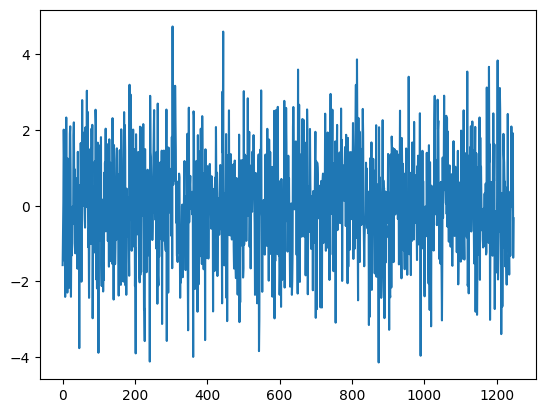
See how the experiment configuration has been parsed and is stored in
experiment_config. We can
directly access it in order to retrieve the plaintext. However, the plaintext
is not directly an int, but it encapsulates one in its value field:
1factory.experiment_config["dut"]["plaintext"]
IterationLiteral(value=1)
Representing multiple configurations#
It is now easy to transform the simple experiment configuration to one which
represents a whole set of parameters. Different custom YAML types, identified
by a ! prefix, can be used. For example, to use different plaintext values,
we could specify:
 1experiment = """
 2dut:
 3  interface: present-encryption
 4  key: 12
 5  plaintext: !range
 6    start: 1
 7    end: 3
 8    resolution: 1
 9
10oscilloscope:
11  interface: oscilloscope
12  amplitude: 10
13"""
14
15factory = ExperimentFactory(bench, experiment)
16factory.initiate_connections()
17pprint(factory.experiment_instruments)
18
19oscilloscope = factory.experiment_instruments["oscilloscope"]
20dut = factory.experiment_instruments["dut"]
INFO:phileas:Bench configuration supplied as a data tree.
INFO:phileas:Bench instrument simulated_present_dut assigned to loader <class 'phileas.mock_instruments.SimulatedPRESENTImplementationLoader'>.
INFO:phileas:Bench instrument simulated_current_probe assigned to loader <class 'phileas.mock_instruments.CurrentProbeLoader'>.
INFO:phileas:Bench instrument simulated_oscilloscope assigned to loader <class 'phileas.mock_instruments.OscilloscopeLoader'>.
INFO:phileas:Experiment configuration supplied as an iteration tree.
INFO:phileas:Matching experiment instrument dut with bench instrument simulated_present_dut.
INFO:phileas:Matching experiment instrument oscilloscope with bench instrument simulated_oscilloscope.
INFO:phileas:Initiating connections to the used instruments.
INFO:phileas.simulated_present_dut:Initiating connection.
INFO:phileas.phileas.mock_instruments:Connected to the PRESENT DUT on /dev/ttyUSB1 with baudrate 115200.
INFO:phileas.simulated_current_probe:Initiating connection.
INFO:phileas.simulated_oscilloscope:Initiating connection.
INFO:phileas.phileas.mock_instruments:[Oscilloscope] Connection initiated.
INFO:phileas:Connections initiation is done.
{'dut': SimulatedPRESENTImplementation(serial_device='/dev/ttyUSB1',
                                       baudrate=115200,
                                       probe=CurrentProbe(last_measurement=None,
                                                          noise_level=1.0,
                                                          gain=1.0),
                                       _key=None,
                                       rounds=32,
                                       snr=1,
                                       points_per_round=20),
 'oscilloscope': Oscilloscope(probe=CurrentProbe(last_measurement=None,
                                                 noise_level=1.0,
                                                 gain=1.0),
                              id='mock-oscilloscope-driver:1',
                              width=32)}
The experiment configuration still requires the same set of instruments.
However, multiple instruments configurations are represented by the experiment
configuration. They are available in the
experiment_config attribute of the
experiment factory, which is an iterable:
1for config in factory.experiment_config:
2  print(config)
3  factory.configure_experiment(config)
{'dut': {'key': 12, 'plaintext': 1}, 'oscilloscope': {'amplitude': 10}}
INFO:phileas.phileas.mock_instruments:PRESENT DUT key set to 12.
INFO:phileas.simulated_oscilloscope:Amplitude set to 10.
{'dut': {'key': 12, 'plaintext': 2}, 'oscilloscope': {'amplitude': 10}}
INFO:phileas.phileas.mock_instruments:PRESENT DUT key set to 12.
INFO:phileas.simulated_oscilloscope:Amplitude set to 10.
{'dut': {'key': 12, 'plaintext': 3}, 'oscilloscope': {'amplitude': 10}}
INFO:phileas.phileas.mock_instruments:PRESENT DUT key set to 12.
INFO:phileas.simulated_oscilloscope:Amplitude set to 10.
However, the factory instantiated some new instruments, which was not required here. We can bypass this by directly parsing the experiment configuration:
1configurations = phileas.parsing.load_iteration_tree_from_yaml_file(experiment)
2pprint(configurations)
CartesianProduct(children={'dut': CartesianProduct(children={'interface': IterationLiteral(value='present-encryption'),
                                                             'key': IterationLiteral(value=12),
                                                             'plaintext': IntegerRange(start=1,
                                                                                       end=3,
                                                                                       default_value=_NoDefault(),
                                                                                       step=1)},
                                                   order=None,
                                                   lazy=False,
                                                   snake=False),
                           'oscilloscope': CartesianProduct(children={'amplitude': IterationLiteral(value=10),
                                                                      'interface': IterationLiteral(value='oscilloscope')},
                                                            order=None,
                                                            lazy=False,
                                                            snake=False)},
                 order=None,
                 lazy=False,
                 snake=False)
Measurements acquisition and storage#
Let us now see how to manage the measurements, and store them conveniently.
Phileas provides some interoperability functions to use Pandas and Xarray
containers. Xarray is often more convenient to use, as the parameters spaces
are often simple cartesian products.
iteration_tree_to_xarray_parameters() can
be used to prepare the datasets. It reads the experiment configurations, and
produces the arguments required to initialize axarray.DataArray or
xarray.Dataset:
1coords, dims_name, dims_shape = phileas.iteration.utility.iteration_tree_to_xarray_parameters(configurations)
2traces = xr.DataArray(coords=coords, dims=dims_name)
3traces
<xarray.DataArray (dut.plaintext: 3)> Size: 24B
array([nan, nan, nan])
Coordinates:
    dut.interface           <U18 72B 'present-encryption'
    dut.key                 int64 8B 12
  * dut.plaintext           (dut.plaintext) int64 24B 1 2 3
    oscilloscope.interface  <U12 48B 'oscilloscope'
oscilloscope.amplitude int64 8B 10However, the oscilloscope outputs 1D arrays, so we should add a dimension, say
oscilloscope.sample, to traces.
1coords["oscilloscope.sample"] = list(range(trace.shape[0]))
2dims_name.append("oscilloscope.sample")
3dims_shape.append(trace.shape[0])
4traces = xr.DataArray(coords=coords, dims=dims_name)
5traces
<xarray.DataArray (dut.plaintext: 3, oscilloscope.sample: 1248)> Size: 30kB
array([[nan, nan, nan, ..., nan, nan, nan],
       [nan, nan, nan, ..., nan, nan, nan],
       [nan, nan, nan, ..., nan, nan, nan]], shape=(3, 1248))
Coordinates:
    dut.interface           <U18 72B 'present-encryption'
    dut.key                 int64 8B 12
  * dut.plaintext           (dut.plaintext) int64 24B 1 2 3
    oscilloscope.interface  <U12 48B 'oscilloscope'
    oscilloscope.amplitude  int64 8B 10
* oscilloscope.sample (oscilloscope.sample) int64 10kB 0 1 2 ... 1246 1247We can now populate traces with measurements. Converting a configuration to a
dictionary that can be used by Xarray for indexing can be done by
data_tree_to_xarray_index():
1for config in configurations:
2    index = phileas.iteration.utility.data_tree_to_xarray_index(config, dims_name)
3    factory.configure_experiment(config)
4    dut.encrypt(config["dut"]["plaintext"])
5    trace = oscilloscope.get_measurement()
6    traces.loc[index] = trace
INFO:phileas.phileas.mock_instruments:PRESENT DUT key set to 12.
INFO:phileas.simulated_oscilloscope:Amplitude set to 10.
INFO:phileas.phileas.mock_instruments:PRESENT DUT key set to 12.
INFO:phileas.simulated_oscilloscope:Amplitude set to 10.
INFO:phileas.phileas.mock_instruments:PRESENT DUT key set to 12.
INFO:phileas.simulated_oscilloscope:Amplitude set to 10.
1traces.plot(x="oscilloscope.sample", col="dut.plaintext")
2plt.show()
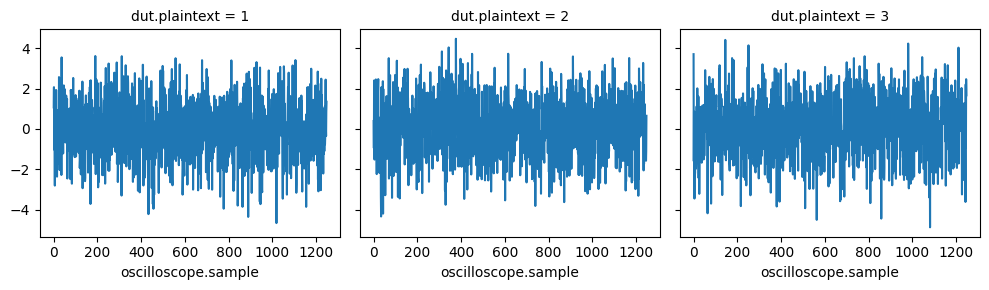
We can see that the traces are quite noisy. PRESENT consists of 32 similar rounds, so we could expect to notice 32 similar patterns. Let us average the measurements, to get rid of some noise and hopefully expose these patterns.
Traces de-noising#
Before we do it, we should disable outputting the logs to the standard output. Indeed, now that we have checked that the experiment runs properly, we don’t need to verify them anymore. Since averaging requires a lot more configurations, they would totally clutter the output. We can disable those which are less severe than warnings with
1logger = logging.getLogger("phileas")
2logger.setLevel(logging.WARNING)
Note
Please note that in an actual experiment, depending on the surrounding workflow, it might be better to redirect the logs to an external file instead.
Let us now carry out 1000 measurements for each of the DUT configurations. We
can do this by adding a new parameter, say iteration, to the top-level
experiment configuration:
 1experiment = """
 2dut:
 3  interface: present-encryption
 4  key: 12
 5  plaintext: !sequence [12345, 67890]
 6
 7oscilloscope:
 8  interface: oscilloscope
 9  amplitude: 10
10
11iteration: !range
12  start: 1
13  end: 1000
14  resolution: 1
15"""
16
17configurations = phileas.parsing.load_iteration_tree_from_yaml_file(experiment)
18
19coords, dims_name, dims_shape = phileas.iteration.utility.iteration_tree_to_xarray_parameters(configurations)
20coords["oscilloscope.sample"] = list(range(trace.shape[0]))
21dims_name.append("oscilloscope.sample")
22dims_shape.append(trace.shape[0])
23traces = xr.DataArray(coords=coords, dims=dims_name)
24
25for config in configurations:
26    index = phileas.iteration.utility.data_tree_to_xarray_index(config, dims_name)
27    factory.configure_experiment(config)
28    dut.encrypt(config["dut"]["plaintext"])
29    trace = oscilloscope.get_measurement()
30    traces.loc[index] = trace
31
32traces
<xarray.DataArray (dut.plaintext: 2, iteration: 1000, oscilloscope.sample: 1248)> Size: 20MB
array([[[ 1.12981407, -1.31004511,  1.13646575, ...,  1.04252183,
          1.11672848, -0.5268217 ],
        [ 0.83331125, -0.32536024, -0.98562334, ..., -1.95401334,
          0.19469743,  0.78950437],
        [-2.67044829, -0.81494182,  0.80119415, ...,  0.44398108,
          2.11590857, -0.58147653],
        ...,
        [ 1.23910048, -1.38197299, -1.41166615, ..., -2.73755745,
         -0.47020445,  0.39726221],
        [-0.13345535, -0.65010395, -1.59522895, ...,  0.61728624,
          1.12430002,  0.6720478 ],
        [-1.15392488, -1.13335883,  3.27754404, ...,  1.44999202,
          0.18486143, -1.16912075]],

       [[ 3.25501995,  0.07540935, -2.19303652, ...,  0.51917847,
          0.92892439,  0.81673783],
        [ 0.30093926,  0.31618611, -0.30205585, ..., -1.01324813,
          1.47327104, -1.42762288],
        [-0.91949338,  1.84772908, -1.08585279, ...,  1.52732599,
         -0.47169627,  0.45248895],
        ...,
        [-0.85037223, -0.77776855,  2.56067357, ..., -0.50108016,
          1.41523839,  0.74475309],
        [ 1.32107741, -2.07097402, -1.39934659, ..., -2.21757147,
         -0.68076575,  1.06950877],
        [-0.55380748,  0.12073824, -0.60336877, ..., -0.17019005,
         -0.15281742,  0.23551035]]], shape=(2, 1000, 1248))
Coordinates:
    dut.interface           <U18 72B 'present-encryption'
    dut.key                 int64 8B 12
  * dut.plaintext           (dut.plaintext) int64 16B 12345 67890
    oscilloscope.interface  <U12 48B 'oscilloscope'
    oscilloscope.amplitude  int64 8B 10
  * iteration               (iteration) int64 8kB 1 2 3 4 5 ... 997 998 999 1000
* oscilloscope.sample (oscilloscope.sample) int64 10kB 0 1 2 ... 1246 1247See how a new coordinate, iteration, has been automatically added to the
Xarray container. We can then display the averaged traces with:
1traces.mean("iteration").plot(x="oscilloscope.sample", col="dut.plaintext")
2plt.show()
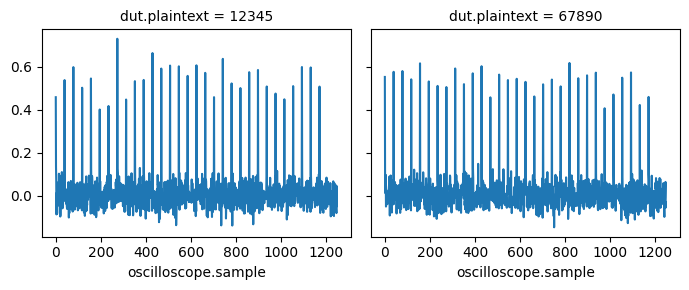
It’s better, the rounds are now visible. However, we are only using two different plaintexts, which is not enough for most side-channel attacks. Let’s see how to generate a lot more !
Generating random data#
We could generate each of the 64-bit plaintexts supported by PRESENT. However, this would be too long to be practically feasible. Let us see how to randomly sample them uniformly in the message space.
The !random node represents values generated by the Numpy random number
generators. We can generate random 64-bit integers with this sample:
 1pt_yaml = """
 2!random
 3  distribution: integers
 4  parameters:
 5    dtype: uint64
 6    low: 0
 7    high: 0x10000000000000000
 8  size: 10
 9"""
10
11pt = phileas.parsing.load_iteration_tree_from_yaml_file(pt_yaml)
The distribution refers to numpy.random.Generator.integers(), whose
arguments are taken from parameters. size specifies the number of generated
values, which will be infinitely many if it is none or not given.
Let us see what values this contains:
1list(pt)
---------------------------------------------------------------------------
ValueError                                Traceback (most recent call last)
Cell In[18], line 1
----> 1 list(pt)

File ~/checkouts/readthedocs.org/user_builds/phileas/checkouts/stable/phileas/iteration/base.py:463, in IterationTree.__iter__(self)
    459 """
    460 Return a two-way resetable tree iterator.
    461 """
    462 if len(self.configurations) == 0:
--> 463     return self._iter()
    465 logger.warning(
    466     "Iterating through a configurable tree. It is automatically "
    467     "unrolled, but it is advised to explicitly call "
    468     "IterationTree.unroll_configurations before iteration."
    469 )
    471 return iter(self.unroll_configurations())

File ~/checkouts/readthedocs.org/user_builds/phileas/checkouts/stable/phileas/iteration/leaf.py:383, in NumpyRNG._iter(self)
    382 def _iter(self) -> TreeIterator:
--> 383     return NumpyRNGIterator(self)

File ~/checkouts/readthedocs.org/user_builds/phileas/checkouts/stable/phileas/iteration/leaf.py:405, in NumpyRNGIterator.__init__(self, tree)
    402 super().__init__(tree)
    404 if tree.seed is None:
--> 405     raise ValueError("Cannot iterate over a non seeded random leaf.")
    407 self.seed = np.random.SeedSequence(list(tree.seed.to_bytes()))

ValueError: Cannot iterate over a non seeded random leaf.
With Phileas, iteration over all configurations must be deterministic, so true
randomness cannot be achieved. To circumvent this, deterministic pseudo-random
number generators are used, which generate seemingly random numbers in a
repeatable way. However, they must be seeded before use: you can use
generate_seeds(), which populate the random
nodes of a tree with seeds that depend on their location, and a user-supplied
salt. This salt can then be used to generate multiple different experiments
with the same configuration file.
1print("With salt='first'")
2pprint(list(phileas.iteration.random.generate_seeds(pt, salt="first")))
3print("\nWith salt='second'")
4pprint(list(phileas.iteration.random.generate_seeds(pt, salt="second")))
With salt='first'
[np.uint64(4763668544205790273),
 np.uint64(2335858191021624770),
 np.uint64(6353463480138259074),
 np.uint64(8025998550422391791),
 np.uint64(5590162691224468292),
 np.uint64(3688076759417327104),
 np.uint64(15424738477626186428),
 np.uint64(4629005567611139026),
 np.uint64(95670261871745950),
 np.uint64(8761369241975504774)]

With salt='second'
[np.uint64(12698494764536959150),
 np.uint64(292925724620152663),
 np.uint64(3731292948904510256),
 np.uint64(4149468841753168599),
 np.uint64(15948806649630493723),
 np.uint64(9171799223842692112),
 np.uint64(49911355859319447),
 np.uint64(10687623950509578999),
 np.uint64(4160189423562294913),
 np.uint64(313738405728289146)]
Note
The RNG from Numpy can only work with at most 64-bit wide integers. If you want
to generate arbitrarily big ones, you can use !random_uniform_bigint
instead.
Randomizing the iteration order#
Let’s suppose that there is a low-frequency noise source in the experimental setup. It affects the measurements, and its value slowly changes in time. Thus, the measurements related to the same plaintext will likely suffer from the same noise value. This will bias the statistical algorithms used to carry out the side-channel attack.
A solution against this is to randomize the iteration order. Instead of recording 1000 traces related with the first plaintext, then 1000 linked to the second, and so on, we can pick the plaintexts randomly, and ensure that each one is picked 1000 times.
With Phileas, this is done by the !shuffle node:
 1pt_yaml = """
 2!shuffle
 3  child: !product
 4    plaintext: !sequence [111, 222, 333]
 5    iteration: !range
 6      start: 1
 7      end: 3
 8      resolution: 1
 9"""
10
11pt = phileas.iteration.random.generate_seeds(phileas.parsing.load_iteration_tree_from_yaml_file(pt_yaml))
12pprint(list(pt))
[{'iteration': 2, 'plaintext': 111},
 {'iteration': 3, 'plaintext': 222},
 {'iteration': 3, 'plaintext': 111},
 {'iteration': 2, 'plaintext': 222},
 {'iteration': 3, 'plaintext': 333},
 {'iteration': 2, 'plaintext': 333},
 {'iteration': 1, 'plaintext': 222},
 {'iteration': 1, 'plaintext': 333},
 {'iteration': 1, 'plaintext': 111}]
Wrapping up and getting further#
We have seen how to use Phileas to:
automatically instantiate and configure the instruments of the experiment bench;
represent simple experiments with configuration files;
create storage containers for the acquired data;
generate random data values and
shuffle the configurations iteration order.
We can wrap all of this in a single experiment file and script:
 1from phileas.parsing import load_iteration_tree_from_yaml_file
 2from phileas.iteration.utility import (
 3    iteration_tree_to_xarray_parameters,
 4    data_tree_to_xarray_index
 5)
 6from phileas.iteration.random import generate_seeds
 7
 8experiment = """!shuffle
 9  child:
10    dut:
11      interface: present-encryption
12      key: !random
13        distribution: integers
14        parameters:
15          dtype: uint64
16          low: 0
17          high: 0x10000000000000000
18        size: 10
19      plaintext: !random
20        distribution: integers
21        parameters:
22          dtype: uint64
23          low: 0
24          high: 0x10000000000000000
25        size: 10
26
27    oscilloscope:
28      interface: oscilloscope
29      amplitude: 10
30
31    iteration: !range
32      start: 1
33      end: 10
34      resolution: 1
35"""
36
37configurations = generate_seeds(load_iteration_tree_from_yaml_file(experiment))
38
39coords, dims_name, dims_shape = iteration_tree_to_xarray_parameters(configurations)
40dut.key = 12
41dut.encrypt(0)
42trace = oscilloscope.get_measurement()
43coords["oscilloscope.sample"] = list(range(trace.shape[0]))
44dims_name.append("oscilloscope.sample")
45dims_shape.append(trace.shape[0])
46traces = xr.DataArray(coords=coords, dims=dims_name)
47
48for config in configurations:
49    factory.configure_experiment(config)
50
51    dut.encrypt(config["dut"]["plaintext"])
52    trace = oscilloscope.get_measurement()
53
54    index = data_tree_to_xarray_index(config, dims_name)
55    traces.loc[index] = trace
56
57traces
<xarray.DataArray (dut.key: 10, dut.plaintext: 10, iteration: 10,
                   oscilloscope.sample: 1248)> Size: 10MB
array([[[[-4.38037485e-01,  7.59864730e-01,  4.34917922e-01, ...,
          -7.63242481e-01, -1.85266377e-01, -5.73231827e-01],
         [ 1.95843817e-01,  1.15172872e-01, -5.19674140e-01, ...,
           4.55491228e-01, -6.24815001e-01,  1.81674314e-01],
         [-6.39479502e-01, -3.79184231e-01,  6.67895217e-01, ...,
          -7.29807150e-02, -2.15769045e+00,  1.42720470e+00],
         ...,
         [-4.07869726e-01,  2.03745978e+00,  3.17547494e+00, ...,
          -5.63567181e-01,  2.18618918e+00, -1.63989315e+00],
         [-1.07745090e-01,  2.54755276e+00, -7.94872625e-01, ...,
          -5.24253331e-02, -4.44919503e-01, -3.25951679e-01],
         [-2.01154823e-01,  1.58461004e+00,  1.39273569e+00, ...,
          -1.07622860e+00, -2.24473202e-01,  7.29289268e-01]],

        [[ 1.65353122e+00, -1.23312651e+00,  4.94792955e-01, ...,
          -1.87494542e+00,  1.11669571e+00, -7.11849235e-01],
         [ 2.08124441e+00,  4.66458036e-01, -5.88411205e-01, ...,
          -3.55638325e-01,  1.62217253e-01, -1.36643297e+00],
         [-4.58209279e-01, -9.22351567e-01, -3.17993717e-01, ...,
           1.40843359e+00,  2.14434644e+00, -7.64408468e-02],
...
          -9.81897107e-01,  2.39308470e+00,  5.77205982e-01],
         [ 2.94931556e-01, -3.26146547e+00,  4.14906337e-01, ...,
           4.24508740e-01,  2.08954141e-03, -1.55362334e+00],
         [ 2.04261706e+00,  3.14283330e-01, -1.47084646e+00, ...,
           5.51592797e-01,  3.70081439e-01, -1.74549938e+00]],

        [[ 2.51378216e+00, -2.81829589e-01,  3.69165305e-01, ...,
          -2.70567038e-01, -2.03270381e+00, -7.87076534e-01],
         [-8.74466629e-01, -1.61569449e+00, -6.82109971e-01, ...,
           2.15778115e-01,  1.96686075e+00, -7.29692215e-01],
         [ 2.65752987e-01, -1.07205169e+00,  2.30192944e+00, ...,
          -1.29054157e+00,  1.73785637e+00,  1.02969149e-01],
         ...,
         [-5.82776526e-02,  1.32377612e+00,  3.28596801e-01, ...,
          -1.67724468e+00, -1.88363951e+00,  6.06247757e-01],
         [-3.63233362e-01,  8.37462336e-01, -1.01239868e-01, ...,
           1.32751223e-01,  4.51598555e-01, -6.06485156e-01],
         [ 1.94573595e+00,  8.38442203e-02,  1.32442673e-01, ...,
          -2.10053846e+00,  2.01149960e+00,  1.99224387e-01]]]],
      shape=(10, 10, 10, 1248))
Coordinates:
    dut.interface           <U18 72B 'present-encryption'
  * dut.key                 (dut.key) uint64 80B 11740344685095552390 ... 177...
  * dut.plaintext           (dut.plaintext) uint64 80B 3849265755518883408 .....
    oscilloscope.interface  <U12 48B 'oscilloscope'
    oscilloscope.amplitude  int64 8B 10
  * iteration               (iteration) int64 80B 1 2 3 4 5 6 7 8 9 10
* oscilloscope.sample (oscilloscope.sample) int64 10kB 0 1 2 ... 1246 1247You can discover new features of Phileas by browsing through the [user guide] (/user_guide/index), or by exploring other examples.